



![D6 Dice [Classic]](data:image/png;base64,iVBORw0KGgoAAAANSUhEUgAAACwAAAAsCAYAAAAehFoBAAAABHNCSVQICAgIfAhkiAAAAm5JREFUWEftmIFRwzAMRekEdAMyAhvQEWACsgFsQNkANigTABuUDWCDMgEwAej1rJzP2ImdKCXcRXe6Nq0tv8g/tpzFkb1dSsi1eCX+Kn4n/mA1zMIo0FLiAHrtQMOwO3cTg8GHAgN65UD53mWAb8TvxT+7Gsf+7wtcChqODSxSKQYvBUaXN+J1n+xE+hSD5wJbg8buF6nciiObpHUBnzqNWmU0Z2JawVPAKzf1fP6VAc6qsvUBQuApgIYJAhip7MEV+NxlFAlM1fbgCryTi5Opknpcb74kavljPVHwd8e2iT10UwJ/caDNgwdwJY4kQlu5xmcHksq390z9AnUMFcAf4uw4yCFWnBwSnPE34k1GHahWgEuAuTM1Mk2H2B4PeC1OZ2sDlIQxvlq0XgmBtXHbHl+54Bbg2aAKlgIeE/xLglOpMZN+RkmE1tTJUrUL2J96BogVJwSncMePW7SioMD6tTCg2RVgCbCylIKzhtJnEGiuJFoS1jycnNt8I+Ns9WSOKQfWt5VcMPV1W/DUf30yHMbayg9NcdICAShTz2dvswDWwVPgJqA6iCWwxryQL0/uAmk89k5npOMYwM8yDqAYWTfd2scApg5Qnc7Ac4ZFDrMk/MVilsQsiWDz+JeSoOzjHa+VjblKNC9S2JnWRtvoGMDNKTp8LwF4LT7kvGYJzJkPBTQ1dwissqhcxvuAWwDHDqd7thTwEPAhwElQBeoC9sGRStdBk/alwKnDaXQRyAXWzjkn5FzgItDSDId32wbeBZw6RWctq6UZjgVFKiyJ+n45BQwo7TZZZIlGFsAaWsEBAgxjSeK4NBhUB/kBcCS+ubfRtrUAAAAASUVORK5CYII=)




D6 DICE
Roll your 6 sided dice online
Quick Tool Links: Coin Flip Simulator, Dice Roller, DnD Dice Roller, Tarot Spread, Number Flashcards
More Dice: All Dice, D4 Dice, D6 Dice, D8 Dice, D10 Dice, D12 Dice, D20 Dice
Table of Contents
Dice Roller: Roll a Die Anywhere with Free Virtual Dice
Dice Roller is a free 3D dice roller web app that makes rolling feel real, smooth, and genuinely fun. If you just want to roll a die fast, you can do it in one tap. If you want deeper control—like changing a D6 face style (dots or numbers) or even setting custom text or images on each surface—you can do that too. It’s built for quick dice roll moments and serious dice game sessions alike, with both desktop and mobile touch support so you can roll dice anywhere.
Instead of feeling like a boring number generator, this online dice roller is designed to look beautiful and behave like real dice. Add dice instantly, roll them all together with a button or spacebar, or tap a single die to reroll it. You even control roll strength by pressing longer for faster rolls—because sometimes you want a gentle toss, and sometimes you want a stronger throw.
What is Dice Roller?
Dice Roller is a virtual dice tool you can use right in your browser to roll dice in a 3D environment. It’s made to imitate the experience of physical dice while giving you extra features you can’t get from real-world dice—like fast adding/removing, total score calculation, and deep customization in D6 Mode.
It works great for board game nights, tabletop RPGs, classroom activities, party games, and those “let’s settle this with a dice roll” moments. And because it supports both mobile touch and desktop controls, it’s just as comfortable on a phone as it is on a laptop.
Two Ways to Roll: D6 Mode vs Multi Mode
Dice Roller comes with two modes, and each one is built for a different style of play.

D6 Mode is where customization shines. You’re working with d6 dice, but you can tweak them way beyond the classic look. Want dots instead of numbers? Or numbers instead of dots? Easy. Want each face to show custom text? Go for it. Want to add images to certain sides? You can do that too. This mode is perfect if you want your dice to match a theme, teach something, represent game actions, or simply look cooler than the default.

Multi Mode is your fast-access library of popular dice. It includes the classic lineup used in many games: d4, d6, d8, d10, d12, d20, and d100. In this mode, each surface is fixed with numeric number faces, so you can jump straight into play without setting anything up. If you’re running a tabletop session or playing a rules-heavy dice game, Multi Mode keeps things simple and familiar.

A quick way to choose:
- Pick D6 Mode if you want deeper customization, custom faces, and a more personal setup.
- Pick Multi Mode if you want classic dice types ready instantly.
How to Roll Dice Online (Quick Start)
You can get started in seconds:
1. Choose a mode
- Use D6 Mode for customization (dots/numbers, custom text, images).
- Use Multi Mode for classic dice types like d20 and d100.
2. Adjust dice quantity / Add styles
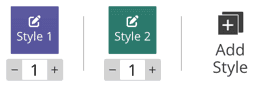
D6 Mode: Click on +/- to adjust dice quantity. Or add styles to create a new d6 dice style.
Multi Mode: Click one each dice type to add die. Click "Manage" to remove the dice.

3. Roll dice
- Tap/click the "ROLL" button to roll all dice. (Press and hold the roll button longer to roll faster and harder.)
- Press spacebar on desktop to roll instantly.
- Tap/click a specific die to roll it individually.

Dice Roller supports two rolling systems. Both use realistic 3D physics and automatic score calculation, but their setup workflows differ.
4. Read results
- Check each die value.
- Use the total score display for the combined result. It shows the combined score relative to the maximum possible outcome.

Dice Tool Customization
You can use the Settings button to change the page background color and toggle the rolling sound on or off.

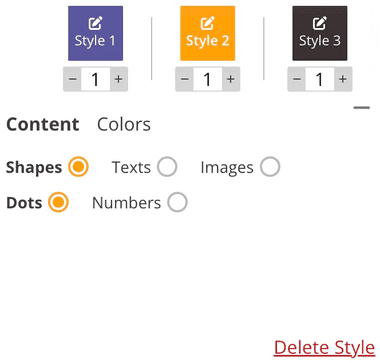
In D6 Mode, you can add up to 20 dice using a maximum of 3 dice styles. For each style, you can customize the face content (dots, numbers, text, or images) and adjust colors individually.
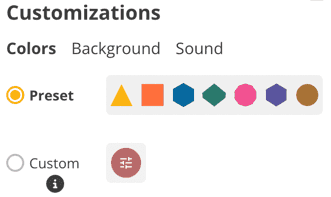
In Multi Mode, you can add an unlimited number of dice, but customization is limited to changing the color for each dice type.
Save Files
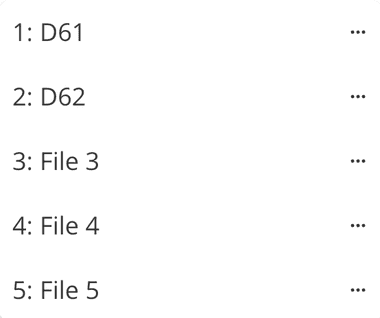
D6 Mode supports advanced configuration management, letting signed-in users save up to 5 editable dice files, reload those saved configurations anytime, and store custom color palettes for quick reuse.
Truly Random Results You Can Trust
Any online dice roller needs to be fair. Dice Roller uses its own random algorithm designed to ensure each roll produces a truly random result, so outcomes stay unpredictable from roll to roll.
That unpredictability is the point of dice. Whether you’re playing a dice game competitively, running a tabletop campaign, or just using free dice for quick decisions, you want results that feel legit. Dice Roller is built with randomness in mind so the dice roll stays honest.
When Dice Roller Is Perfect to Use
Dice Roller isn’t limited to classic gameplay. You can mix and match dice however you like—build the exact setup you need for a dice game, an RPG session, a classroom activity, or even a custom probability challenge. With flexible customization and multiple dice types, it works well for:
- Virtual game nights — everyone can roll together using the same shared setup.
- Dungeons & Dragons (D&D) and RPGs — configure rolls for spells, damage, and events using the full dice set. If you want an experience tailored specifically to Dungeons & Dragons mechanics, try our dedicated DnD Dice Roller.
- Classroom activities — make math, probability, and decision-making more engaging with live dice rolls.
- Quick decisions — settle small debates instantly with a simple roll.
- Creating your own dice game — test new rules, invent mechanics, and play anywhere.
Overall, Dice Roller is a Google dice roller alternative designed for people who want more control, better customization, and a more enjoyable rolling experience.
Share the Fun of Dice Roller
Send your exact dice tray to friends, players, or students with a shareable link—perfect for remote gaming, teaching, or just sharing something fun.
To do it, click Share to generate a unique URL that saves your current tray setup, including dice types, colors, and order. Anyone who opens your link can instantly load your configuration and start rolling right away, making it great for both collaborative sessions and competitive play.

Help Shape the Future
We love feedback! Got a new dice type, feature, or dice roller idea? Visit our contact page and help us make Dice Roller the best online dice roller for everyone.
Final Roll — Dice Roller Changes the Game!
Our Dice Roller is more than a virtual dice app—it’s your go-to tool for any dice game, quick dice roll, or random roll a dice decision. With lifelike 3D rolling, custom dice sets, and easy sharing, it keeps things fun while staying simple to use. Want a coin flip? Try our Coin Flip Simulator for instant heads-or-tails. Into tarot? Yes or No Tarot gives clear answers in a click. Whatever your game, Dice Roller is the free, fun, and fair way to play.
Ready to roll dice online? Try Dice Roller today — customize, roll, share, and discover why it's the best online dice roller experience!