



![D6 Dice [Classic]](data:image/png;base64,iVBORw0KGgoAAAANSUhEUgAAACwAAAAsCAYAAAAehFoBAAAABHNCSVQICAgIfAhkiAAAAm5JREFUWEftmIFRwzAMRekEdAMyAhvQEWACsgFsQNkANigTABuUDWCDMgEwAej1rJzP2ImdKCXcRXe6Nq0tv8g/tpzFkb1dSsi1eCX+Kn4n/mA1zMIo0FLiAHrtQMOwO3cTg8GHAgN65UD53mWAb8TvxT+7Gsf+7wtcChqODSxSKQYvBUaXN+J1n+xE+hSD5wJbg8buF6nciiObpHUBnzqNWmU0Z2JawVPAKzf1fP6VAc6qsvUBQuApgIYJAhip7MEV+NxlFAlM1fbgCryTi5Opknpcb74kavljPVHwd8e2iT10UwJ/caDNgwdwJY4kQlu5xmcHksq390z9AnUMFcAf4uw4yCFWnBwSnPE34k1GHahWgEuAuTM1Mk2H2B4PeC1OZ2sDlIQxvlq0XgmBtXHbHl+54Bbg2aAKlgIeE/xLglOpMZN+RkmE1tTJUrUL2J96BogVJwSncMePW7SioMD6tTCg2RVgCbCylIKzhtJnEGiuJFoS1jycnNt8I+Ns9WSOKQfWt5VcMPV1W/DUf30yHMbayg9NcdICAShTz2dvswDWwVPgJqA6iCWwxryQL0/uAmk89k5npOMYwM8yDqAYWTfd2scApg5Qnc7Ac4ZFDrMk/MVilsQsiWDz+JeSoOzjHa+VjblKNC9S2JnWRtvoGMDNKTp8LwF4LT7kvGYJzJkPBTQ1dwissqhcxvuAWwDHDqd7thTwEPAhwElQBeoC9sGRStdBk/alwKnDaXQRyAXWzjkn5FzgItDSDId32wbeBZw6RWctq6UZjgVFKiyJ+n45BQwo7TZZZIlGFsAaWsEBAgxjSeK4NBhUB/kBcCS+ubfRtrUAAAAASUVORK5CYII=)




DnD DICE ROLLER
Your all-in-one dnd dice roller online
Dice Roll Log
Quick Tool Links: Coin Flip Simulator, Dice Roller, DnD Dice Roller, Tarot Spread, Number Flashcards
DnD Dice Roller: Your All-in-One DnD Dice Companion
If you love rolling Dnd dice but don’t always have your full DnD dice set on hand, this DnD dice roller is built for you. It’s a web app that gives you realistic 3D rolls, automatic modifier math, and clean roll history, so your Dungeons & Dragons sessions stay fast, fair, and focused on the fun instead of the calculator.
Whether you’re running a tense boss fight, checking a stealth score, or spamming Eldritch Blast, this Dice roller DnD tool keeps every roll clear and transparent for both players and dungeon masters.
What This DnD Dice Roller Actually Does
Think of the app as your digital dice tray plus rules assistant. It’s more than just spinning DnD dice on a screen:
- Fully featured DnD dice roller for all seven polyhedral dice
- Smart handling of advantage, disadvantage, proficiency, expertise, and more
- Separate profiles for every player or creature
- Automatic success/fail checks against AC or DC
- Clean roll history with timestamps and breakdowns
- Works great as DnD dice online for remote or hybrid games
All of this lives in your browser, so it’s easy to use whether you’re around a real table or spread across different screens.
Step 1: Set Up Player Profiles
You can create, manage, and swap between multiple players in a couple of clicks. This allows both groups and individual players to maintain independent character settings, modifiers, and roll history.

Shared Device (Single Screen)
- Built for in-person, around-the-table sessions
- Everyone shares one device, but each player has their own profile
- Each profile keeps its own settings and roll history separate
Individual Devices (Multi-Screen)
- Ideal for online or hybrid DnD games
- Every player opens the app on their own device
Each Profile Includes:
- Dedicated dice configuration for that character
- Personalized modifier setup
- Independent roll history
- Custom name and color for quick recognition
Switching players is simple: click a profile to activate it. Click the same profile again to edit the display name and color, so you can color-code the party or distinguish enemies easily.
Step 2: Configure Your Roll
Once your player is selected, you set up what kind of roll you need. The app is designed to feel like using a real dnd dice set, just faster.
Choose your die type
Pick from the full set of dungeons and dragons dice:
- D4
- D6
- D8
- D10
- D12
- D20
- D100

Roll types
Each roll is tagged with a type, so the app can apply the right logic:
- Attack – weapon swings, spell attacks
- Check – ability and skill checks
- Save – saving throws against spells and effects
- Damage – how much hurt you’re dealing
- Healing – how much you’re restoring
- Initiative – getting combat order sorted fast

Roll method (normal, advantage, disadvantage)
For D20 rolls, you can pick:
- Normal – standard single roll
- Advantage – roll two D20s, take the higher
- Disadvantage – roll two D20s, take the lower
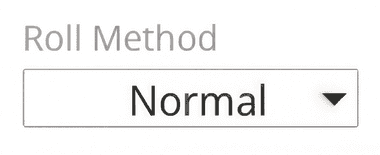
The app handles the DnD 5e advantage/disadvantage rules automatically, and you clearly see both dice so there’s never any argument about what was rolled.
Step 3: Apply Modifiers
This is where the app really pulls ahead of basic DnD dice online tools. Instead of doing math in your head every time, you set your modifiers once and let the app do the heavy lifting.

Ability Modifier
Enter your character’s ability modifier (from -5 to +10). That covers:
- Strength for melee strikes
- Dexterity for ranged and finesse attacks
- Intelligence, Wisdom, or Charisma for spellcasting and relevant checks
Proficiency
You can choose how proficiency is applied:
- Normal – your standard proficiency bonus
- Expertise – double proficiency for skills or tools you’re amazing at
- Half – half proficiency (rounded down) for features like Jack of All Trades
Bonus & Other Dice:
There are slots for extra bonuses from -20 to +20 to cover:
- Magic weapons or armor
- Buff spells and temporary effects
- Situational bonuses and penalties
Sometimes your DnD dice roller needs more than just a flat bonus. This field handles dice expressions only, so things behave exactly like they would if you grabbed multiple physical DnD dice sets from your bag.
Valid examples:
- +1d6
- -2d8
- +1d6+1d4 (multiple dice at once)
Ignored inputs:
- +4 → ignored (no dice to roll)
- -3 → ignored
- +1d6+4 → only +1d6 is rolled, the +4 is ignored
That keeps the logic clean: this field is for extra dice, not raw numbers.
Target AC / DC
You can also set a target number:
- Armor Class for attack rolls
- Difficulty Class for checks or saves
The app then automatically marks the roll as a success or failure, so you don’t have to compare it by eye each time.
Step 4: Roll and Review Results
When everything is configured, it’s time to throw the DnD dice.
Click Roll to fire off the current configuration, or hit ROLL ALL to roll every configured setup at once. ROLL ALL is perfect for:
- Multi-attack actions
- Extra damage dice from features or crits
- Big area-of-effect spells hitting several targets
Each result shows:
- Final total with all modifiers applied
- Whether it hit or missed / passed or failed (if you set a target)
- Automatic critical hit (natural 20 on attack rolls)
- Automatic critical failure (natural 1 on attack rolls)
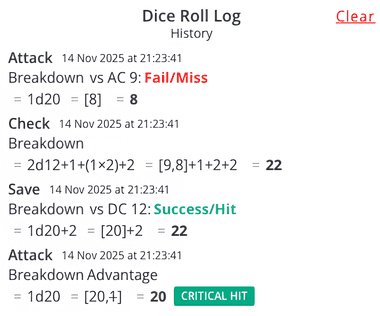
- A clear breakdown in the roll history so you can see exactly what happened
Features That Elevate Your Gaming Experience
Authentic Advantage & Disadvantage System
The advantage/disadvantage system is fully baked into the app.
When you roll with advantage:
- Two D20s roll at the same time
- The higher value is automatically used
- The lower value is still shown but visually de-emphasized
When you roll with disadvantage:
- Two D20s roll
- The lower value is automatically taken
- The higher one is still visible so everyone knows what happened
This works for attacks, checks, and saves, just like the tabletop rules. It feels like tossing real DnD dice on the table, but with less “wait, which one did we pick again?”
Smart Math Behind Every Roll
Under the hood, the app handles all the usual DnD math you’d normally juggle in your head or on scratch paper:
- Ability modifiers from -5 to +10
- Proficiency in normal, expertise, or half-proficiency modes
- Extra bonuses from -20 to +20
- Extra dice from magic, features, or spells (like +1d6, +2d8, or +1d6+1d4)
Instead of hunting through your character sheet every time, you can treat this like a curated DnD dice set that’s already wired to your stats. Once it’s configured, you just click and go.
Roll Types That Understand Context
Each roll type uses logic that matches how DnD actually works:
Attack rolls
- Natural 20s count as critical hits and automatic hits
- Natural 1s are automatic misses
- Totals compare against your target’s AC (if set)
Damage and healing rolls
- Can’t go negative (no negative damage or “harmful healing”)
- Great for multi-dice combinations like 3d8+1d6 radiant, etc.
Checks and saves
- Rolls compare directly to the target DC
- You get an immediate “success” or “failure” status right in the UI
Initiative
- Quick D20 roll with relevant modifiers
- Helps you set combat order quickly and consistently
Dynamic Target Tracking AC and DC
The app’s target tracking keeps combat and skill challenges moving at a good pace.
Set targets like:
- Enemy AC for attacks
- Spell DCs for saving throws
- Challenge DCs for skill checks
The visual feedback is immediate and unambiguous — green for success, red for failure — keeping the game flowing smoothly.


Critical hits always succeed on attacks, and critical failures always miss, just like the rules say.
Comprehensive Roll History
Every roll gets recorded in a scrollable log with all the important details:
- Player or profile name
- Roll type and die configuration
- All modifiers and extra dice applied
- Final calculated total
- Hit/miss or pass/fail result (when a target is set)
- Critical hit or critical failure indicators
- Timestamp so you know the order of events
This detailed history serves multiple purposes — tracking damage throughout combat, reviewing contested rolls, settling rule disputes, or analyzing character performance over sessions.
Practical Applications for Different Users
Great for Dungeon Masters
DMs often have the hardest job when it comes to managing multiple creatures, rolls, and effects. This Dice roller DnD tool helps by letting you:
- Create profiles for different monsters, bosses, and NPCs
- Store their attack bonuses and damage dice
- Roll multi-target effects quickly with ROLL ALL
- Fire off random encounter rolls or treasure tables on the fly
Instead of stacking physical DnD dice sets behind the screen, you can keep everything tidy in one place and still show players their rolls when needed.
Great for Players
For players, the app makes your character feel “ready to go” at all times:
- Pre-configure your most used attacks and spells
- Set up different damage dice for different spell slots
- Store all your key skill modifiers
- Handle complex turns like multi-attack fighters or mixed bonus actions without losing track of bonuses
It’s especially handy if you don’t always carry a full DnD dice set, or if your physical dice are currently buried in a backpack on the other side of the room.
Awesome for Learning and Teaching DnD
New to DnD or teaching someone else? This tool doubles as a learning aid:
- See how modifiers change results in real time
- Experiment with advantage vs disadvantage to feel the probability difference
- Learn how attack rolls, saves, and checks each work
- Show new players the breakdown of their attacks and spells step by step
For anyone curious about the math behind dungeons and dragons dice, this makes it far less intimidating.
3D Dice That Feel Like the Real Thing
If you’re a dice goblin at heart, the visual side matters too. The app renders every die in full 3D with realistic shapes, tumbles, and bounces, so rolling feels satisfying even when you’re using DnD dice online instead of physical plastic.
- Accurate geometry for each die (D4, D6, D8, D10, D12, D20, D100)
- Customizable colors to match your character theme or your favorite DnD dice
- Snappy, responsive animations that feel like real rolls
And behind the scenes, a cryptographically secure random number generator ensures your rolls are fair, unpredictable, and untampered with. No “hot dice” streaks that mysteriously favor one player.
Share, Feedback, and Other Handy Tools
When you find a setup that works for your table, it’s easy to share the love. Use the built-in sharing button to send the DnD dice roller link to your friends, group chat, or community.
If you’ve got ideas for new features, support for other systems, or improvements, you can drop suggestions via the contact page. The tool is built to grow based on what real players and DMs want.
You can also check out related tools:
- For quick, simple rolls outside of DnD: Dice Roller
- For instant 50/50 decisions: Coin Flip Simulator
- For a mystical spin on choices: Yes or No Tarot
Ready to Roll Initiative?
This DnD dice roller turns the messy part of DnD—the constant math and checking—into smooth, intuitive clicks. You still get the feel of rolling DnD dice, but with:
- Automatic calculations
- Clear success/fail feedback
- Powerful roll history
- Flexible player profiles
Whether you’re a DM building epic encounters or a player trying to squeeze every last point out of your build, this DnD dice roller has your back. Grab your next encounter, fire up your favorite character, and let the app handle the numbers while you focus on the story.
Roll the DnD dice, shape your destiny, and let your next adventure begin.